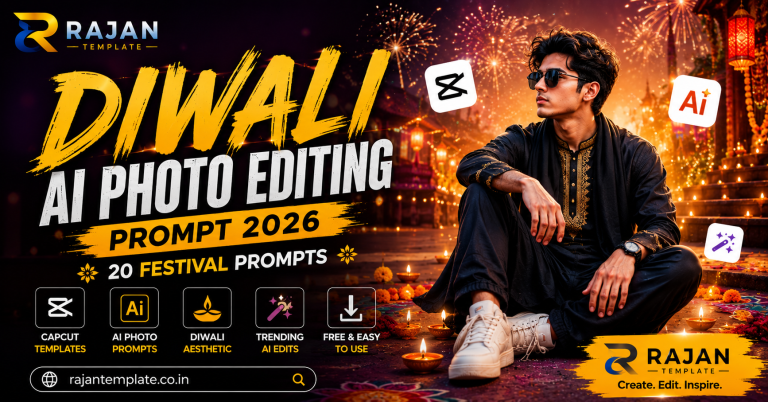
Diwali is the one week of the year when your feed turns into a competition. Everyone posts, and the photos that stop the scroll are almost never the ones taken on the night itself. They are edited. This page gives you a complete Diwali AI photo editing prompt set – twenty of them, written out in full, free to copy, and built to keep your real face intact.
You do not need a camera, a photographer, or a paid app. You need one clear photo of yourself and a free AI tool. Everything else is in the boxes below.
Two short sections come first. They cover why prompts fail and how to run them properly. If you have done this before, skip straight to the prompts.
What Makes a Good Diwali AI Photo Editing Prompt?
A prompt is the instruction you type after uploading your photo. The AI reads it and rebuilds the image around what you asked for. Most people type something like “make my Diwali photo beautiful” and then wonder why the result looks like a stranger standing in front of a video game background.
The Problem With Short Prompts
A short prompt leaves every important decision to the model. It picks the lighting. It picks the lens. It decides how much of your face to keep. Diwali makes this worse than usual because the festival is visually loud – diyas, rangoli, fireworks, gold, marigold – and an under-specified prompt will pile all of it into one frame until the image looks like a greeting card.
The Five Parts Every Prompt Needs
Copy This Structure for Your Own Ideas
Every prompt on this page follows the same five-part order. Once you see it, you can write your own for any occasion:
Preserve instruction. State plainly that the face must not change. This is the single most important line.
Wardrobe and props. Fabric, colour, jewellery, what is held or worn.
Setting. Where the person is standing, and how blurred the background should be.
Lighting. Direction, colour temperature, hardness. For Diwali this is usually a diya or a string of lights acting as the key light.
Camera. Focal length, aperture, aspect ratio, and the word photorealistic.
Drop any one and quality falls. Drop the lighting line and the image immediately reads as fake, because real Diwali photographs are defined by where the flame is.
Which AI Tool Should You Use for Diwali Edits?
All twenty prompts work in more than one tool, but the output differs enough to matter.
ChatGPT
The most reliable at holding your likeness across a heavy wardrobe change, which is exactly what a Diwali edit is. It is also the strictest. If it declines to edit a photo of a real person, remove any wording that sounds like transformation and describe the clothes instead. You are asking for a saree, not a new identity.
Google Gemini
Better at fabric. Silk, zari borders and gold jewellery come out with more convincing texture, and the free allowance is more generous. It drifts slightly more on facial likeness across repeated regenerations, so save the first result you like instead of chasing a better one. You can start from the official Gemini app.
Free Web Editors
Check the Export Size First
Plenty of free sites will produce a good preview and then hand you a watermarked 1024px file. Confirm what you get before spending twenty minutes refining a prompt. And if a site wants your face without a visible privacy policy, close the tab – that photo becomes training data.
How to Use These Diwali Prompts Step by Step
Six steps. Under three minutes once you have done it once.
Step 1: Pick the Right Source Photo
Front-facing or three-quarter angle, at least 1000 pixels wide, even light across the face. No sunglasses, no existing filter, nothing covering the jawline. This choice affects your result more than the prompt does. If your only good photo is soft or low resolution, run it through the fixes in our normal to 4K prompt guide before you start.
Step 2: Upload the Photo Before You Paste
Attach the image first, then paste the prompt into the same message. Reversing the order makes most tools generate a brand new picture instead of editing yours.
Step 3: Copy the Prompt Exactly
Use the copy button. Do not retype it, and do not delete the lighting or camera lines to make it shorter – those lines are doing the work that makes the image look real.
Step 4: Run the Three-Second Check
Eyes, Hairline, Hands
These three fail first. Glassy eyes, a hairline that has quietly moved, or a sixth finger. Spot any of them and regenerate before you start rewriting the prompt.
Step 5: Fix With One Sentence, Not a Rewrite
Add a single correcting line such as “keep the original hairline and eyebrow shape exactly” rather than starting over. Rewriting the whole prompt usually introduces a new problem while solving the old one.
Step 6: Upscale Before You Post
Instagram compresses hard. Export at the largest size available, then upscale to at least 2000 pixels on the long edge. An image that looks crisp in your gallery can arrive soft on someone else’s feed.
20 Free Diwali AI Photo Editing Prompts (Click to Copy)
Every box below holds one complete Diwali AI photo editing prompt. Tap Click to Copy, paste it underneath your uploaded photo, and generate. The tip under each box tells you the one thing that usually goes wrong with that specific prompt, so you are not guessing when a result comes back wrong.
Prompt 1: Classic Diya Portrait
01Classic Diya Portrait
Edit the uploaded photo. Keep the face 100% unchanged - same features, same skin tone, same expression. Dress the person in a deep maroon silk kurta with gold zari border. They hold a lit clay diya in cupped hands at chest height. Background: a dark home courtyard, heavily blurred, with a row of out-of-focus diyas. Lighting: the diya flame is the only key light - warm underlight on the face, deep falloff behind. Photorealistic, 85mm, f/1.8, natural skin texture. Portrait 4:5.
Tip: Start here. If your face changes on this one, the source photo is the problem, not the prompt.
Prompt 2: Rangoli Floor Shot
02Rangoli Floor Shot
Edit the uploaded photo, face unchanged. The person kneels beside a large circular rangoli made of red, yellow and white flower petals, placing a diya on its edge. Outfit: mustard yellow cotton saree with a red border. Setting: a clean terracotta floor, soft-focus doorway behind with a marigold toran. Lighting: warm overhead lamp plus flame glow from below. Photorealistic, 35mm, f/2.8, slight top-down camera angle. Vertical 4:5.
Tip: The top-down angle is what makes this look like a real photo rather than a composite.
Prompt 3: Fairy Light Bokeh Portrait
03Fairy Light Bokeh Portrait
Edit the uploaded image. Preserve the face exactly. The person stands wrapped loosely in a string of warm white fairy lights held in one hand. Outfit: cream silk kurta, simple gold studs. Background: a dark wall covered in out-of-focus fairy lights forming large round bokeh circles. Lighting: soft warm key from camera left, gentle rim light from the string itself. Photorealistic, 85mm, f/1.4, shallow depth of field. Portrait 4:5.
Tip: Ask for f/1.4 specifically. Anything narrower and the bokeh circles turn into small dots.
Prompt 4: Traditional Saree Diwali Look
04Traditional Saree Diwali Look
Edit the uploaded photo of a woman, face completely unchanged. Dress her in a royal blue Banarasi silk saree with heavy gold zari work, a gold choker, jhumkas and bangles. Fabric must show visible weave, realistic folds and creases. Setting: an ornate wooden doorway framed with marigold garlands. Lighting: warm golden hour light from the right, soft fill on the left. Photorealistic, 85mm, f/2.0, natural skin. Portrait 4:5.
Tip: Add the fabric-texture line to every saree prompt or the silk comes out looking like plastic.
Prompt 5: Sherwani Diwali Look for Men
05Sherwani Diwali Look for Men
Edit the uploaded photo, face unchanged. Dress the person in a cream raw-silk sherwani with subtle gold embroidery, a maroon stole, and a single pearl brooch. Setting: a marble hallway with brass lamps along the wall, background blurred. Lighting: warm tungsten key from the upper left, soft shadow definition on the jaw. Photorealistic, 85mm, f/2.2, fine grain. Portrait 4:5.
Tip: Sherwani prompts fail on the collar. Add ‘high mandarin collar, crisp and structured’ if it comes out floppy.
Prompt 6: Fireworks Rooftop Shot
06Fireworks Rooftop Shot
Edit the uploaded photo. Face unchanged. The person stands on a rooftop at night looking up, one hand shielding the eyes. Outfit: black kurta with silver detailing. Background: a city skyline with distant fireworks bursting, motion trails visible, heavily blurred. Lighting: cool blue ambient night light with warm orange flashes from the fireworks on the face and shoulders. Photorealistic, 50mm, f/2.0, long exposure feel on the fireworks only. Vertical 9:16.
Tip: Say ‘fireworks in the distance, not near the subject’ or the model puts sparks on the face.
Prompt 7: Sparkler Close-Up
07Sparkler Close-Up
Edit the uploaded photo, preserving the face exactly. The person holds a lit sparkler at shoulder height, sparks trailing. Outfit: white cotton kurta, sleeves rolled. Background: pure black, nothing else. Lighting: the sparkler is the sole light source - hard, cool white light on one side of the face, everything else in shadow. Photorealistic, 85mm, f/2.8, fast shutter freezing individual sparks. Square 1:1.
Tip: Black background prompts keep facial likeness better than any other setup. Use this if other prompts distort your face.
Prompt 8: Family Diwali Group Photo
08Family Diwali Group Photo
Edit the uploaded group photo. Keep every face unchanged and in its original position. Dress everyone in coordinated festival wear - maroon, gold, cream and deep green with gold detailing. Setting: a decorated living room with a diya-lined mantelpiece and a marigold toran across the doorway. Lighting: warm even indoor light so every face is equally exposed. Photorealistic, 35mm, f/4 for edge-to-edge sharpness. Horizontal 3:2.
Tip: Group edits break above five people. Beyond that, split the photo in half and edit each side separately.
Prompt 9: Diwali Poster With Your Name
09Diwali Poster With Your Name
Create a festival poster from the uploaded photo. Keep the face exact. Place the person on the right third in a gold and maroon outfit holding a diya. Left third stays clear for text. Add 'Happy Diwali' in an elegant gold serif at the top and '[YOUR NAME]' in smaller white letters below it. Background: deep navy with gold mandala line art, soft glowing particles and a faint rangoli pattern in the lower corner. Photorealistic subject, flat graphic background. Vertical 9:16.
Tip: Replace [YOUR NAME] before pasting. If the spelling comes out wrong, ask the tool to redo the text only.
Prompt 10: Lakshmi Puja Moment
10Lakshmi Puja Moment
Edit the uploaded photo, face unchanged. The person sits cross-legged with hands folded in prayer, eyes closed, in front of a small home mandir with a decorated idol, flowers and a brass lamp. Outfit: simple cream cotton kurta with a red tilak. Lighting: the brass lamp provides warm low light from the front, room otherwise dim. Photorealistic, 50mm, f/2.0, respectful natural framing. Portrait 4:5.
Tip: Keep this one simple. Adding jewellery or heavy fabric makes a quiet devotional image look staged.
Prompt 11: Golden Hour Terrace Portrait
11Golden Hour Terrace Portrait
Edit the uploaded photo. Preserve the face 100%. The person leans on a terrace railing, half turned to camera. Outfit: burnt orange kurta with a cream dupatta lifting slightly in the wind. Background: rooftops and a hazy setting sun, strongly blurred. Lighting: low golden sun directly behind creating a warm rim light on the hair and shoulders, soft bounce on the face. Photorealistic, 135mm telephoto compression, f/2.0. Portrait 4:5.
Tip: 135mm compression is the detail that makes background rooftops look distant instead of pasted on.
Prompt 12: Marigold Garland Frame
12Marigold Garland Frame
Edit the uploaded photo, face unchanged. The person stands in a doorway framed by thick orange and yellow marigold garlands hanging from above, some strands in the foreground and slightly out of focus. Outfit: deep green silk kurta with gold buttons. Lighting: soft warm daylight from the front, gentle shadow on the doorway behind. Photorealistic, 50mm, f/2.0, foreground flowers softly blurred. Portrait 4:5.
Tip: Foreground blur is what gives the shot depth. Say ‘some garland strands in the foreground, out of focus’.
Prompt 13: Black Background Gold Portrait
13Black Background Gold Portrait
Edit the uploaded photo. Keep the face completely identical. Pure black background, nothing else in frame. Outfit: black silk kurta with fine gold embroidery on the chest. A single gold chain visible. Lighting: one soft key light at 45 degrees from the right, strong falloff, no fill light. Colour: desaturated overall except the gold embroidery, which keeps full warmth. Photorealistic, 85mm, f/2.8, fine film grain. Portrait 4:5.
Tip: The most likeness-safe prompt in this list. Use it as your fallback whenever a face comes out wrong.
Prompt 14: Diwali Shopping Street Scene
14Diwali Shopping Street Scene
Edit the uploaded photo. Face unchanged. The person walks through a crowded festival market carrying a paper bag of diyas, mid-stride, slightly turned toward camera. Outfit: mustard kurta with a light shawl. Background: stalls hung with lanterns and lights, crowd blurred with visible motion. Lighting: mixed warm stall lights, slightly uneven and realistic. Photorealistic, 35mm, f/2.5, subject sharp, background motion blur. Vertical 9:16.
Tip: Realistic street photos have uneven light. Do not ask for even lighting here or it flattens out.
Prompt 15: Couple Diwali Portrait
15Couple Diwali Portrait
Use both uploaded photos. Keep both faces unchanged and matched to the correct person. Dress one in a maroon Banarasi saree with gold jewellery, the other in a cream sherwani with a maroon stole. Pose: standing close, one holding a diya between them. Background: a home entrance with fairy lights and a rangoli at their feet, blurred. Lighting: warm diya glow from below plus soft warm fill from the front. Photorealistic, 85mm, f/2.2. Portrait 4:5.
Tip: Upload both images in one message and name who is who, or the faces get swapped.
Prompt 16: Cinematic Wide Diwali Frame
16Cinematic Wide Diwali Frame
Edit the uploaded photo into a cinematic wide shot. Face unchanged. The person walks away from camera down a long verandah lined with diyas on both sides, slightly turned so the profile shows. Outfit: flowing cream kurta catching a light breeze. Colour grade: warm highlights, teal shadows, mild halation around the flames. Photorealistic, 24mm, f/4, deep focus, dust visible in the light. Horizontal 16:9.
Tip: This is the frame to feed into an AI video tool afterwards. Wide shots animate far more cleanly than close-ups.
Prompt 17: Kids Diwali Portrait
17Kids Diwali Portrait
Edit the uploaded child photo. Keep the child's face completely unchanged and do not smooth the skin. Dress the child in a small yellow kurta pyjama with a red waistcoat and a tiny gold chain. They hold a sparkler, arm extended, laughing. Background: a warm home interior with fairy lights, heavily blurred. Lighting: soft warm light from the front, sparkler glow on one cheek. Photorealistic, natural child skin texture, 50mm, f/2.2. Square 1:1.
Tip: Never let the tool smooth a child’s skin. Over-smoothing is the fastest way to make an edit look obviously AI.
Prompt 18: Vintage Film Diwali Look
18Vintage Film Diwali Look
Edit the uploaded photo, face unchanged. Render it as a 1990s film photograph. The person stands beside a table of lit diyas holding a brass plate. Outfit: simple cotton salwar kameez in faded pink. Colour: warm shifted highlights, slightly green shadows, visible grain, mild vignette, small light leak in one corner. Lighting: harsh on-camera flash look, typical of a point-and-shoot. Photorealistic film simulation, 35mm, f/5.6. Square 1:1.
Tip: The flash look is the point. Do not ask for soft lighting here or the vintage effect disappears.
Prompt 19: Instagram Story Vertical Frame
19Instagram Story Vertical Frame
Edit the uploaded photo for a vertical story. Face unchanged. Place the person in the lower two-thirds of the frame in a maroon and gold outfit holding a diya, leaving clean dark space at the top for text. Background: a dark wall with warm fairy light bokeh, strong blur. Lighting: warm key from the lower left. Photorealistic, 50mm, f/1.8. Vertical 9:16, subject not centred - offset slightly right.
Tip: Leaving text space at the top is what makes this usable. Centred subjects get covered by story stickers.
Prompt 20: Diya Reflection in Water
20Diya Reflection in Water
Edit the uploaded photo. Preserve the face exactly. The person crouches beside a shallow brass bowl of water with floating diyas and rose petals, one hand touching the surface. Outfit: white cotton kurta with a thin gold border. Setting: a dark stone floor at night. Lighting: only the floating flames, reflecting off the water onto the face from below, everything else near black. Photorealistic, 50mm, f/2.0, visible reflections and slight ripples. Portrait 4:5.
Tip: Underlighting from water is dramatic but unflattering on some faces. Add ‘soft fill light from the front’ if it looks harsh.
Common Mistakes That Ruin Diwali AI Edits
Five failures account for almost every disappointing result. Each one has a one-line fix you can add to any Diwali AI photo editing prompt on this page.
The Face Comes Out Looking Like Someone Else
Almost always a source photo problem rather than a prompt problem. Low resolution, an extreme side angle, or a filter already baked into the image will all cause drift. Re-shoot facing a window in daylight and try again. If it still happens, switch to Prompt 13 – black background portraits hold likeness better than any other setup in this list.
Everything Comes Out Too Orange
Why Diwali Prompts Do This More Than Others
Festival prompts stack warm words – diya, gold, marigold, amber, glow – and the model compounds every one of them. Add “balanced white point, not over-saturated, natural colour” to the end of any prompt and the grade calms down immediately. This is the single most common complaint with Diwali edits and the fix takes five seconds.
The Tool Refuses the Request
Remove anything that sounds like changing who a person is, and describe clothing and setting instead. “Maroon Banarasi saree, gold jewellery, marigold doorway, warm evening light” produces the same picture and never triggers a refusal. You are describing wardrobe, not identity. The same rewrite works for the two-person edits in our couple prompt collection.
Hands and Fingers Come Out Wrong
Still the weakest area in every current model, and Diwali prompts make it harder because so many of them involve holding a diya. Either pick a prompt where the hands sit out of frame, or add “hands relaxed, fingers clearly separated, correct anatomy”. If two attempts fail, crop rather than fight it.
The Fabric Looks Painted On
Add “natural fabric texture, visible weave, realistic folds and creases” to the wardrobe line. Default output smooths silk until it reads as vinyl, and on a Banarasi saree that is immediately obvious. The same fix carries over to every outfit-heavy edit, including the ones in our saree prompt guide.
Bonus Tips for Your Diwali Post
A good Diwali AI photo editing prompt gets you the image. What you do with it afterwards decides whether anyone sees it.
Post Timing
Diwali content peaks the evening before and the morning of the main day. Publishing three days early gets almost nothing, and publishing the day after gets less than that. Have your images ready in advance and hold them.
Turn One Still Into a Reel
The Simple Version
Take your best result, load it into any AI video tool, and give it a short motion instruction such as “slow push in, flame flickers gently, fabric moves in a light breeze”. Three seconds of movement outperforms a static image on Reels every time.
If You Only Do One Thing
Use Prompt 16. Wide cinematic frames animate cleanly because there is space around the subject. Close-up portraits warp around the face the moment motion is applied.
Build a Set, Not a Single Image
Pick four prompts with a shared colour story – 1, 4, 12 and 20 all sit in the warm maroon and gold range – and post them as a carousel. A consistent set reads as intentional. Twenty unrelated edits read as noise. If you want a second look for the same week, the same approach works with our Navratri prompt set.
Frequently Asked Questions
Are these Diwali AI photo editing prompts free?
Yes. Every Diwali AI photo editing prompt on this page is free to copy and use with no sign-up and no download. The AI tools have their own free tiers with daily limits, which is the only place a cost could appear.
Will the AI keep my real face?
If your source photo is sharp, front-facing and at least 1000 pixels wide, yes. Every prompt here opens with an explicit instruction to leave the face unchanged, which is exactly why they are written that way.
Can I use these prompts on my phone?
Yes. Both ChatGPT and Gemini support photo upload in their mobile apps, so the whole process works from a phone. Nothing here needs a computer.
Which prompt is best for girls?
Prompts 4, 11 and 15 are the most requested. Change the wardrobe line to lehenga or salwar kameez if you prefer, and leave the lighting and camera lines exactly as they are.
Can I use these edited photos commercially?
For your own social posts, yes. For paid client work or printed products, check the terms of the specific AI tool you used, because they differ and some restrict commercial output on free plans.
Why does my result look different from the description?
AI output varies between runs even with an identical prompt. Generate three or four times and keep the best one. That variation is normal and not a mistake on your side.
Final Words
That is the full Diwali AI photo editing prompt set – twenty prompts, written out completely, with nothing hidden behind a link or a download. Start with Prompt 1 for the safest result, Prompt 13 if your face keeps changing, and Prompt 16 if you plan to turn the image into a Reel.
Save this page. The same prompts work next Diwali with nothing more than a date change, and the five-part structure underneath them is reusable for any festival you want to edit for. Once you have a result you are happy with, post it as part of a set rather than on its own – four consistent images will always outperform one good one.
winter snowfall AI photo editing prompt guide with 20 copy-ready prompts, simple steps, useful editing tips, and related Rajan Template ideas for 2026.
Copy 20 Janmashtami AI photo editing prompt ideas on Rajan Template. Simple English prompts, natural editing tips, easy steps and ready styles for 2026.
traditional boy AI photo editing prompt guide with 20 copy-ready prompts, simple steps, useful editing tips, and related Rajan Template ideas for 2026.
Copy 20 Monsoon aesthetic AI photo editing prompt ideas on Rajan Template. Simple English prompts, natural editing tips, easy steps and ready styles for 2026.
20 free saree AI photo editing prompts for ChatGPT and Gemini. Click to copy, keep your real face, and turn one ordinary photo into a full saree portrait set.