CapCut Y2K Retro Template: 2000s Camera and VHS Effects (TUTORIAL)
A Y2K retro reel does not need old equipment or a complicated edit. It needs bright light, vivid colour, direct flash, playful energy and one or two light retro effects, all of which you can create with your phone and CapCut’s free editor. When those elements match, even a birthday or a road trip can look like a cheerful throwback to the early 2000s.
This guide teaches you how to build that look yourself in CapCut, using your own photos and clips. There is no template link, download link, QR code, or ready-made project file here, and none is needed. You will build the edit from your own material, step by step, with full control over the colours, the cuts and the finish.
Before you start, an important rule. Use only photos and footage you filmed yourself, or material you have clear permission to use. Do not re-upload other creators’ clips, old television footage or other people’s photos, even with credit, because credit is not permission and re-uploading risks a takedown or a muted reel. Your own material is also more original, because nobody else has the same party or trip photos.
Quick answer: Start a new 9:16 project in CapCut, gather 6 to 8 bright clips or 8 to 10 flash photos, and apply one warm, vivid grade to all of them. Trim each clip to 1 to 3 seconds, add a light VHS effect or a date stamp, use bold simple text, and cut on an upbeat beat. Keep the reel between 15 and 30 seconds, and export at 1080 x 1920.
14 Y2K Retro Reel and Photo Ideas You Can Build in CapCut
Each idea below is a complete format. Pick one that fits the material you already have, and follow its steps in order. Every idea works with your own photos and clips, and none of them needs a downloaded template.
1. The Camcorder Birthday Reel
Film a birthday with a handheld, slightly shaky camera and add a date stamp in the corner. Keep the clips short and cheerful, with bright colours and natural sound. The camcorder look suits birthdays perfectly, because the style itself feels like an old home video.
2. The Flash Photo Party Series
Take a set of flash photos at a party or gathering, with the flash on and the background dark. Show each photo for 1 to 2 seconds with a quick cut between them. Direct flash is the heart of the Y2K look, and it makes ordinary photos feel instantly retro.
3. The VHS Road Trip Montage
Film a road trip from inside the car, catching road signs, snacks and friends singing. Add light VHS tracking lines and a soft colour shift, and keep the cuts fast. Road trips already feel nostalgic, and the VHS treatment turns them into a throwback video.
4. The Early 2000s Fashion Reel
Film outfits with bright colours, denim, shiny accessories and chunky shoes, using close shots of details. Keep the camera playful, move between full outfits and close details, and use a fun pop track. The fashion carries the era, so the effects only need to stay light.
5. The Retro Dance Challenge Edit
Film a simple dance in a bright room or outdoors, with the camera fixed and the whole body in frame. Cut on the beat, add a colourful frame or sticker-free border, and keep the colours vivid. A clean dance shot with retro colour looks better than a busy edit with many effects.
6. The School Days Photo Slideshow
Gather old-style photos of school, college or childhood friends and show them in order, one photo every 2 seconds. Add a gentle zoom and a date-style caption in plain text. A simple slideshow with matching retro colours feels warmer than a slideshow packed with transitions.
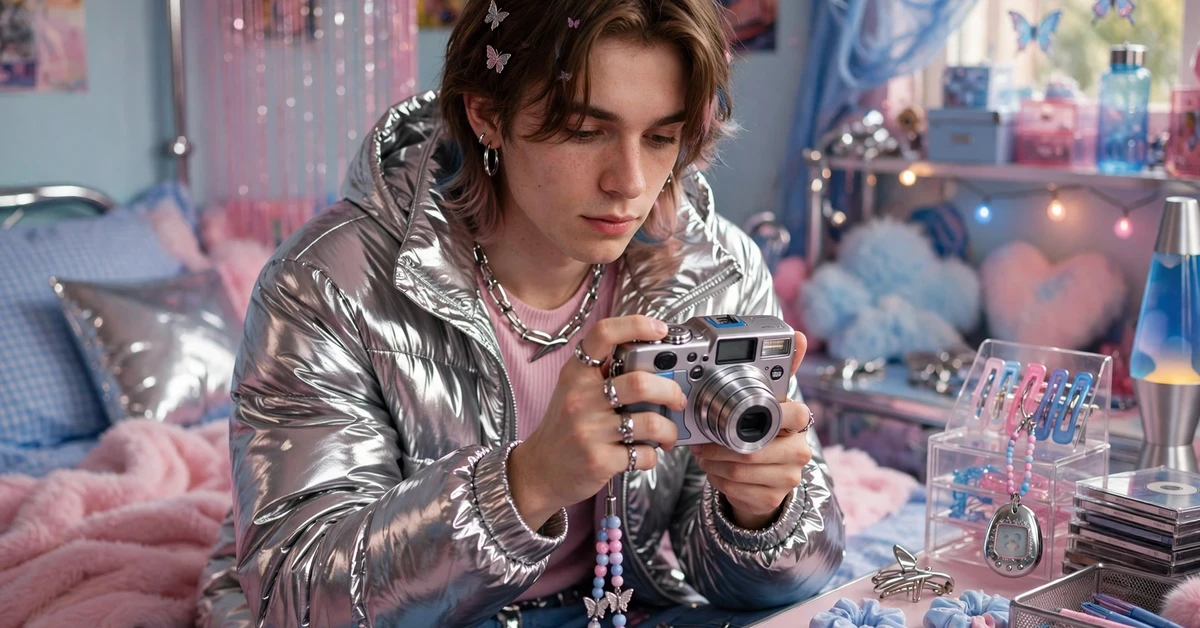
7. The Y2K Bedroom Tour
Film a bedroom tour with bright bedding, posters, lights and small collections, moving slowly from corner to corner. Keep the colours saturated and the cuts simple. Bedroom tours suit the Y2K style because the room itself holds most of the retro detail.
8. The Arcade and Mall Day Reel
Film an outing to a mall, arcade or market, catching games, shop windows and food stalls. Use quick cuts, bright colours and a cheerful track. Busy, colourful places already look like the 2000s, so film plenty of details and cut them tightly.
9. The Disposable Camera Look Photos
Edit a set of photos to look like disposable camera shots: slightly soft, a little grainy, with warm colours and a direct flash feel. Show them as a slideshow with plain cuts. The charm of this look is its imperfection, so do not over-sharpen or over-clean the photos.
10. The Y2K Picnic Reel
Film a picnic with friends, bright food, blankets and sunshine, using short, happy clips. Keep the camera handheld and the colours vivid, and end with a group photo. Outdoor daylight suits the Y2K style well, because the colours stay bright and natural.
11. The Retro Music Video Style Edit
Pick a favourite song you have the right to use, film a few lip-sync or dance clips, and cut them on the beat with colourful, simple effects. Keep the shots bright and the camera moving gently. A music-style edit needs energy and colour more than complex transitions.
12. The 2000s Tech Nostalgia Reel
Film old-style objects you own, such as a flip phone, a chunky camera or a CD player, with close shots of buttons and screens. Add a date stamp and a simple VHS line effect. Objects tell the era story quickly, and close shots make them feel like a museum of the 2000s.
13. The Beach Day Flash Reel
Film a beach day with bright sun, water and friends, using flash-style bright photos mixed with short video clips. Keep the colours saturated and the cuts fast. Beach light already gives the vivid, slightly overexposed feel that suits Y2K edits.
14. The Y2K Night Out Reel
Film an evening out with friends, using flash photos and short clips of lights, food and laughter. Keep the flash look strong and the cuts quick, and use a fun, upbeat track. Night flash photos are the most recognisable Y2K image, so let them lead the reel.
Full Step-by-Step Workflow in CapCut
Follow this workflow after choosing your idea. The order matters: music first, selection second, cuts third, polish last.
Step 1: Gather bright, playful clips and photos
Collect clips and photos with bright colours, daylight or flash light, and cheerful moments. Remove anything dark, muted or unrelated, because the Y2K look depends on vivid colour and energy. For a first reel, 6 to 8 clips or 8 to 10 photos are enough.
Step 2: Start a 9:16 project and add music first
Open CapCut, tap New Project, and add a fun, upbeat track before any video. Choose music from CapCut’s own audio library or audio you have the right to use. Mark the beats so your cuts land on the rhythm and the reel feels lively from the start.
Step 3: Order clips for energy, not chronology
Place your strongest, brightest clip first, then alternate between action and detail shots. A strong opening grabs attention, and alternating shots keeps the energy up. Do not worry about telling the day in exact order; feeling matters more than sequence here.
Step 4: Trim each clip to 1 to 3 seconds
Cut each clip to its liveliest moment, usually 1 to 3 seconds. Y2K reels move quickly, so long, still clips will slow the energy down. Play the trimmed sequence once and remove any clip that feels slow or dull.
Step 5: Apply a bright, warm retro grade
Use one filter, or the same manual adjustments, on every clip: slightly higher saturation, slightly warmer colour, and a touch more brightness. Apply it to all clips first, then adjust single clips only to match the others. One consistent grade keeps the reel looking planned.
Step 6: Add VHS and camcorder effects lightly
Add a light VHS tracking effect, a soft grain, or a date stamp in a corner, but use only one or two effects at a time. Heavy effects stacked together make the video hard to watch. A date stamp plus light grain is often enough to sell the retro feeling.
Step 7: Add simple, bold text in a retro style
If you add text, use a bold, rounded font in white or a bright colour, with a short phrase such as a date or a place. Keep text on screen for at least 2 seconds and use the same font throughout. Retro text should be playful and readable, not tiny or crowded.
Step 8: Add quick cuts and one fun transition
Use plain cuts for most changes, and save a fun transition, such as a zoom or a flash, for one or two special moments. When every cut uses a different transition, the reel feels messy. Plain cuts with good timing look more confident.
Step 9: Export and watch on your phone
Export at 1080 x 1920 and watch the full reel on your phone with sound. Check that the colours look bright, the text is readable, the effects are light, and the energy stays high from start to finish. Fix any problem in the editor and export again.
Settings and Tips
Film in bright daylight or use your phone flash for photos, because the Y2K look starts with light. Direct flash at night and strong daylight both give the slightly overexposed, vivid feel of early 2000s photos. If a photo looks too perfect and clean, a little grain and warmer colour will usually bring back the retro feeling.
Keep the total length between 15 and 30 seconds for a reel, or 20 to 40 seconds for a photo slideshow. Y2K reels are energetic, so they should feel short and punchy. If your first cut runs over 40 seconds, remove the weakest clips first and bring the best flash photo earlier.
Use only your own photos, videos and music you have the right to use. Retro edits often reuse old songs and clips, but re-uploading other people’s work risks a takedown or a muted reel. Your own party, trip and fashion clips are more original anyway, and they suit the personal, home-video feeling of the style.
Check the date stamp and any text carefully before exporting. A date stamp with the wrong year, a misspelled place name, or text cut off at the edge will distract viewers from an otherwise good edit. Place text well inside the frame and read it once on your phone before posting.
Common Mistakes to Avoid
The most common mistake is stacking too many retro effects at once. VHS lines, heavy grain, a date stamp, a colour shift, a frame and a sticker together make the video hard to watch. Choose one or two effects, apply them lightly, and let the bright colours and flash photos carry the rest of the look.
The second mistake is using dark, muted footage for a Y2K reel. The style needs bright light and vivid colour, so a set of dark evening clips will never look Y2K, no matter which filter you add. Save dark clips for a moody edit and film Y2K material in daylight or with flash.
Another frequent mistake is cutting too slowly. Y2K reels should feel lively, so clips longer than 4 seconds, especially still shots, will drain the energy. Trim each clip to its best moment, cut on the beat, and keep the total length short.
Finally, do not use a different font, filter or transition on every clip. A retro reel looks planned when the grade, font and effects stay the same throughout. Pick one filter, one font and one main effect, and use them consistently from the first clip to the last.
Troubleshooting
The VHS effect looks too strong or messy
Lower the effect strength until the picture stays clear, and remove any second effect that overlaps it. A light tracking line and soft grain are enough. If the effect still hides faces or text, use it on only a few clips instead of the whole reel.
Colours look washed out after the filter
Raise saturation slightly and check the result on your phone, because editor previews can differ from the exported file. Match all clips to the same grade first, then adjust single clips only to match the others, and avoid pushing saturation to its extreme.
Flash photos look too harsh
Soften harsh flash photos by lowering brightness slightly and warming the colour a little. Keep the flash look, since it is part of the style, but remove the blown-out white patches by trimming the photo or choosing a slightly softer shot from the same set.
The reel feels slow despite the retro effects
Shorten each clip to 1 to 3 seconds, cut on the beat, and move the brightest clip to the start. Energy comes from timing and clip choice, not from effects alone, so replace the slowest two clips before adding more effects.
Text or date stamp is cut off at the edge
Move text and stamps well inside the frame, leaving a clear margin on all sides. Phones and apps crop the edges slightly, so anything placed at the very edge risks being cut off. Check the exported file on your phone before posting.

Frequently Asked Questions
What is a Y2K retro edit?
A Y2K retro edit recreates the look of early 2000s home videos and photos: bright colours, direct flash, camcorder dates, VHS lines and playful energy. It suits birthdays, trips, fashion and party photos, and it works best with your own bright, cheerful material.
Do I need a template link to make a Y2K retro reel in CapCut?
No. This guide provides no template link or download, because the full result can be built manually in CapCut’s free editor: a new project, trimmed clips, one bright retro grade, light VHS effects and simple bold text. Building it yourself gives you full control over the timing and the look.
How do I get the VHS look in CapCut?
Use a light VHS or retro effect, add soft grain, and keep the colours warm and vivid. Use only one or two effects at a time, and keep the picture clear enough that faces and text stay readable. A date stamp in the corner completes the camcorder feeling.
Can I use old photos for a Y2K slideshow?
Yes, if they are your own photos or photos you have permission to use. Show each photo for about 2 seconds, use a gentle zoom and plain cuts, and apply the same warm, bright grade to the whole set. Matching colours matter more than the number of photos.
Why does my Y2K reel look messy?
Messy Y2K reels usually stack too many effects, fonts and transitions at once. Remove effects until only one or two remain, use one font and one filter throughout, and cut on the beat. A simple, bright edit with good timing looks far more retro than a busy one.
What export settings should I use for Instagram reels?
Export in 9:16 vertical at 1080 x 1920. Watch the exported file once on your phone before posting, and check that the colours look bright, the text is readable, the effects are light, and the energy stays high from start to finish.
Conclusion
A good Y2K retro reel is built from bright light, vivid colour, quick cuts and just one or two retro effects. Start with the flash photo party series or the camcorder birthday reel, since each needs only your own photos and clips, and keep the grade, font and effects consistent. Film in daylight or with flash, cut on the beat, and let the cheerful energy carry the edit. The nostalgia will follow, without any downloaded template.
Related Guides
If you enjoyed this guide, these related tutorials use the same CapCut workflow of beat marking, trimming, consistent grading, and clean text: