CapCut Gym Motivation Template: Beat Drop and Progress Reels
A good gym reel does not need dramatic claims or before-and-after hype. It needs energy, rhythm and honesty: real training clips, cut to the beat, with progress shown clearly and simply. This guide shows you how to build a CapCut Gym Motivation Template style reel yourself, whether you want a beat-drop training montage or a quiet progress reel that documents your routine over time.
The same editing ideas work for home workouts, gym sessions and outdoor training. What matters is clip selection, pacing and clean presentation. Keep the focus on effort, form and consistency, and let the edit support the training rather than overshadow it.
Quick answer: Pick a track with a strong beat drop, open with a short setup clip, cut training clips on the beat, use slow motion for one or two key lifts, show progress with simple side-by-side or dated clips, add minimal text, and export in high quality. Build the edit in CapCut yourself following the steps below; no template link or file is provided with this article.
18 Gym Motivation Editing Ideas: Beat Drops and Progress Reels
Use these ideas as a menu. A beat-drop reel and a progress reel have different pacing, so pick the ideas that fit the reel you are making, and do not try to force both styles into one short video.
It also helps to decide the purpose of the reel before you open CapCut. A beat-drop reel is meant to show energy and rhythm in under a minute, so it favours short clips and strong cuts. A progress reel is meant to document change over time, so it favours matched angles, clear labels and a calmer pace. When the purpose is clear, clip selection becomes easy: you keep the shots that serve that purpose and leave out the rest, even if they looked fun to film.
1. Open with preparation, not the heaviest lift
Start with lacing shoes, chalking hands, filling a bottle or walking into the gym. A two-second setup clip gives context and makes the first training clip land harder. Viewers connect with routine before intensity, and the setup also gives the music a moment to build.
2. Land the first working set on the beat drop
Choose a track with a clear drop, then place the first full working-set clip exactly on it. Keep the setup clips before the drop short and calm. In CapCut, mark the drop on the timeline, then drag the hero clip so its first rep starts on that marker. The cut itself creates the impact, so no extra effect is needed.
3. Cut on the rep, not in the middle of it
Cut between reps or between sets, not halfway through a lift. Cutting mid-rep looks jarring and can make form hard to follow. Watch each clip, find the natural pause at the top or bottom of a rep, and place your cut there. This small discipline makes the whole reel feel professional.
4. Use slow motion for one lift, not every lift
Slow down a single clean rep, such as a squat descent or a controlled press, and keep the rest at normal speed. Slow motion draws attention, so spending it on one lift gives that lift weight. Split the clip around the chosen rep, apply speed to that segment only, and check that the movement stays smooth.
5. Show progress with dates, not adjectives
For a progress reel, simple date labels do the work: “Week 1” and “Week 8”, or two dated clips of the same exercise. Film the same angle and the same exercise for both clips so the comparison is fair and easy to read. Avoid commentary about results; let the two clips speak for themselves.
6. Keep the same angle for progress comparisons
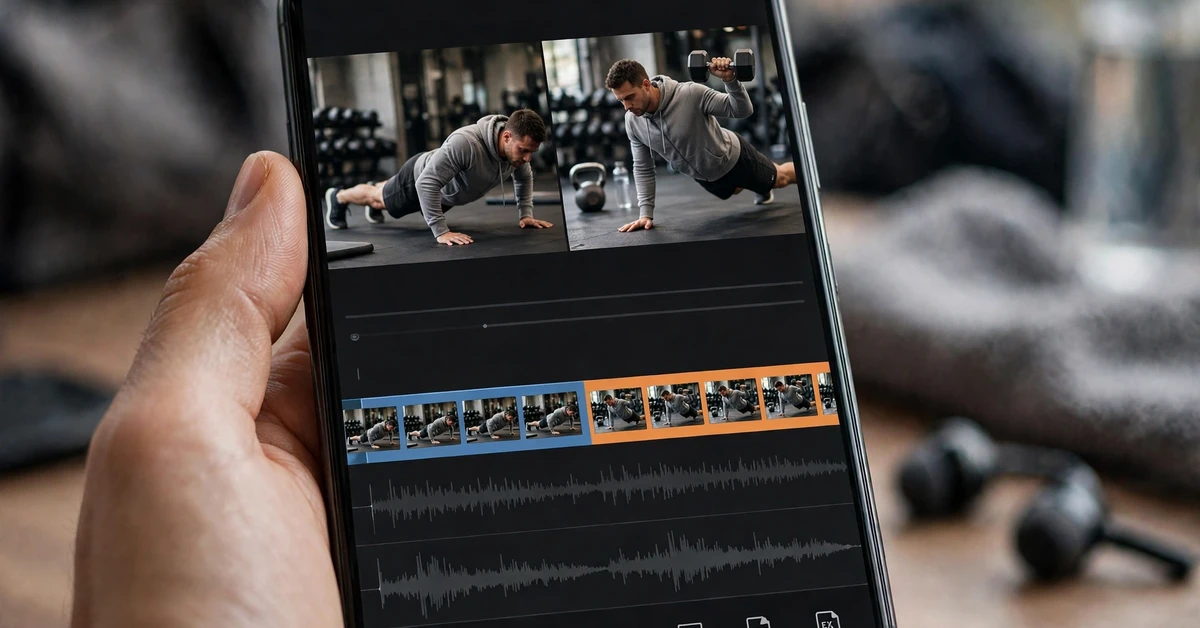
Progress is only visible when the setup matches. Use the same distance, angle and exercise for the earlier and later clips, and keep lighting similar where possible. Place the two clips back to back with a simple cut, or side by side if the framing allows it. Consistency is what makes a progress reel believable.
7. Alternate close-ups and wide shots for rhythm
A reel of only close-ups feels cramped, and a reel of only wide shots feels distant. Alternate: a wide shot of the set, a close-up of grip or foot placement, then back to wide. This rhythm keeps the viewer oriented and makes the training look complete rather than fragmented.
8. Use rest moments as breathing space
Brief rest clips, drinking water, walking between stations or setting up the next exercise, give the reel natural pauses. Place one rest clip after two intense clips, especially in a longer reel. Pauses make the intense moments feel stronger, because the viewer is not overloaded from start to finish.
9. Add text for exercise names and structure only
Short text labels help: the exercise name, the day of the routine, or a simple section title such as “Warm-up” or “Main Set”. Keep each label to a few words, on screen for two seconds, in a clean readable font. Text should guide the viewer, not narrate every rep.
10. Match music energy to the training phase
Use calmer music or lower volume for warm-up and setup, then bring the energy up for working sets. If one track covers the whole reel, dip its volume slightly during setup and restore it for the main sets. The volume change signals structure without needing extra explanation.
11. Build a three-part training story
Give the reel a simple arc: arrive and warm up, train through two or three exercises, finish with a calm closing shot such as re-racking weights or stretching. This shape works for both beat-drop reels and progress reels, and it gives the viewer a sense of a complete session.
12. Use a speed ramp for a conditioning finisher
For a fast finisher, such as rope work or a short cardio burst, start at normal speed, ease into slightly faster speed for two seconds, then return to normal speed. Keep the ramp gentle; a sudden jump looks rushed. Preview the ramp full-screen, because speed changes are hard to judge on a small timeline preview.
13. Keep colours consistent across gym lighting
Gyms mix daylight, overhead lights and coloured accent lighting, which can make clips clash. Apply one filter at low strength across the whole reel, after adjusting brightness on the darkest clips. One consistent look makes separate sessions feel like one video, which matters most for progress reels filmed weeks apart.
14. End on effort, not exhaustion
Choose a final frame that feels complete: a controlled last rep, weights re-racked, or a calm walk out of the gym. Let the music fade slightly over the last second instead of stopping abruptly. A composed ending leaves a better impression than a shaky, breathless final clip.
15. Reuse one session in two different reels
One training session can supply both a fast beat-drop reel and a slower progress clip. Edit the energetic version first, then reuse the cleanest, best-framed clips for the progress version with calmer music and date labels. This saves filming time and keeps your content consistent.
16. Film form-friendly angles
Choose angles that show the movement clearly: side-on for squats and presses, front-on for rows and curls, and a stable wide angle for full-body work. Avoid extreme angles that hide the movement. Clear angles help the viewer follow the exercise and make your own form easier to review later.
17. Edit for muted first viewing
Many viewers first watch on mute. Check that the opening two seconds make sense without sound: a clear subject, readable text if any, and a strong first image. If the reel only works with music, strengthen the visuals in the opening before publishing.
18. Save a clean cut before final effects
Before adding transitions, filters and text, duplicate the project or export a clean cut. If an effect later looks wrong, you can return to the clean version instead of rebuilding the timeline. This habit is especially useful for progress reels, where you may revisit the same clips weeks later.

Full Step-by-Step Workflow in CapCut
Start a new project in CapCut and import your training clips. Watch them once and select the best setup clip, the best working-set clips for two or three exercises, one slow-motion candidate and a calm ending clip. Remove blurry, duplicated or poorly framed clips so the timeline stays clean.
Arrange the clips in session order: warm-up, main sets, finisher, closing. Trim each clip to its best two to four seconds, cutting at natural pauses between reps. Add the music track, mark the beat drop, and align the first working set to it. Apply slow motion to one chosen rep only, then apply one consistent filter at low strength.
For a progress reel, add simple date labels to the comparison clips and keep the same exercise order in both periods. Add exercise-name text sparingly, balance music against any original audio, and preview the reel twice: once with sound and once on mute. Export a draft, watch it outside CapCut, and make only small final corrections. Reviewing outside the editor catches pacing problems the timeline hides.
Organisation matters for progress reels in particular. Keep the earlier and later clips for each exercise in matching pairs on the timeline, and label your project with the exercise and the period it covers. If you plan to update the reel again in a few weeks, keep the project file and the original clips; rebuilding a progress reel from scratch each time wastes the very consistency that makes it convincing.
Settings and Tips for Gym Footage
Gym footage is often bright in places and shadowed in others. Raise brightness slightly on dark clips only, and reduce highlights if overhead lights blow out. Keep saturation moderate so coloured equipment and clothing do not dominate the frame. Keep sharpening low, because heavy sharpening emphasises noise in dim corners of the gym.
For transitions, simple cuts are best, with an occasional dissolve between calm sections such as warm-up and closing. For text, use a clean font, a colour that contrasts with the background, and a position away from moving subjects. For audio, keep music steady and dip it briefly only for setup or rest moments. Keep the reel between twenty and sixty seconds: long enough to show a session, short enough to hold attention.
A useful habit is to film a little extra at the start and end of each set. Those spare seconds give you clean cut points and make trimming far easier than working with clips that start and end mid-rep.
For music, listen to the whole track before editing, not just the opening. A track that builds steadily and drops once is easier to cut to than one that changes energy every few seconds. Keep the music volume consistent across the reel, dipping it only briefly for setup or rest moments, and check the final mix on headphones as well as on the phone speaker. A mix that sounds balanced in both places will hold up wherever the reel is watched.
Before sharing, run a final checklist over the finished reel. Watch it once from start to finish without touching the timeline, and note anything that jars: a cut that lands mid-rep, a label that stays up too long, or a clip that repeats an earlier angle without adding anything. Fix only those notes, then watch it once more. This short review pass is what separates a reel that feels finished from one that feels almost finished, and it usually takes less than five minutes.
Common Mistakes to Avoid
The most common mistake is cutting mid-rep, which breaks the flow and hides form. Another is using slow motion on every set, which removes its impact. A third is adding motivational text over every clip; a few well-chosen labels are stronger than constant commentary.
Also avoid starting with the hardest clip before any setup, using a different filter on every clip, and ending abruptly mid-set. Avoid comparing clips filmed at wildly different angles and calling them a progress comparison; mismatched angles make comparison meaningless. Finally, do not promise outcomes in text or captions. Show the training honestly and let viewers draw their own conclusions.
Another mistake is packing too many exercises into one reel. Five exercises in forty seconds gives each one only a few seconds, so none of them reads clearly. Two or three exercises, shown properly, make a stronger reel than a rushed tour of a whole session. If you trained more, save the remaining exercises for a second reel, or use them as the next update in a progress series.
Troubleshooting
Music and cuts feel out of sync. Listen with the waveform visible, mark the beat drop precisely, and nudge clips a few frames at a time. Small adjustments matter more than large moves.
Slow motion looks choppy. Shorten the slow segment or use a milder slowdown. Clips filmed at a low frame rate cannot be slowed as far as high-frame-rate clips.
Progress clips do not match. Refilm the later clip from the same angle and distance as the earlier one, with the same exercise and similar framing. Matching setup matters more than any effect.
Colours clash between sessions. Apply the same filter at the same strength to all clips, and adjust the most different clip until it sits comfortably beside its neighbours.
The reel feels repetitive. Remove the weakest exercise clip, or add one rest or setup clip to break the pattern. One unnecessary repeated shot can make a whole reel drag.
Text labels clash with busy backgrounds. Shorten the label, move it to a plainer area of the frame, or place it over a rest clip instead of over moving weights. If it still fights the background, drop the label; the exercise is usually clear from the footage itself.
FAQ
How long should a gym motivation reel be?
Between twenty and sixty seconds works well. That range shows a real session without repeating the same exercises. For a single-exercise progress clip, twenty to thirty seconds is usually enough.
Do I need a gym partner to film good clips?
No. A phone propped securely, a tripod where the gym allows it, or a stable surface can capture most angles. Film only where recording is permitted, respect other gym members’ privacy, and keep equipment and walkways clear.
How do I make a progress reel without misleading viewers?
Use the same exercise, angle and framing for both clips, label them with honest dates, and avoid outcome claims. The comparison should show what you did, not promise what anyone else will achieve.
Which transitions work best for gym reels?
Simple cuts work best, especially cuts placed between reps or between sets. An occasional dissolve suits calm sections such as warm-up or stretching. Flashy transitions usually distract from the training itself.
Can I build this fully in CapCut’s free editor?
Yes. Trimming, splitting, speed changes, filters, text, audio mixing and export are all covered by the core tools described in this guide. You build the edit yourself in CapCut; no template file is needed.
Should I include music with lyrics?
Either works, but instrumental or low-lyric tracks keep attention on the training and on any text labels. If you use a lyrical track, keep text short so viewers are not trying to read and listen at once.
Conclusion
A strong gym reel comes from honest clips, clean cuts and a clear structure. Start with a setup, build to the beat drop, show one or two lifts well, and close calmly. For progress reels, match your angles, label your dates simply, and let the footage speak. Make one reel, review it honestly, and improve one element next time. That steady habit builds a recognisable style far faster than chasing effects.
Keep your next session simple as well. Film the same two or three angles, keep the same project structure, and reuse what worked. Over a few weeks, that consistency turns individual reels into a small series that viewers can follow, and it makes each new edit faster than the last.